Showing posts with label retail pos systems. Show all posts

Friday, June 1, 2012

Ways to install Point of sale in Network mode

In the Server:
  • SQL Standard Version has to be installed and started. 
  • Install the Pre Requisites (see Q3 for details)
  • Check up in the SQL Enterprise manager, whether the old Counter or IPO databases are present, if so delete them.
  • Check up in the Add Remove programs, whether old point of sale Server version exists, if so remove it.
  • Check up in the rot of the hard disk, whether any LDF or MDF file of Counter or IPO is present, if so delete them. This check has to done only after checking the SQL Enterprise manager for old Counter and IPO DB and deleting them if exists.
  • Check up in Program files folder of the drives whether old point of sale server folder exists, if so delete it.
  • Install the Server Component –note down the path where it is installed.
  • After installation – share the path. Under Permissions - add the required user with full powers. 
In the Client:
  • Confirm that the SQL in the server is running
  • Confirm that the Network link is proper
  • Confirm that you have logged in as user with full rights (or as a power user).
  • Install the SQL Client component
  • Install the Pre Requisites
  • Check up in the Add Remove programs, whether old point of sale client version exists, if so remove it.
  • Find or search for poin*.cab file in Windows or System or System32 folder. If found, delete it.
  • Check up in the Program Files folder of the drive, whether the old installation folder - ie., Meghdoot Millennium Point Of Sale exists, if so , delete the folder.
  • Install the Client Component and then configure. 

Tuesday, December 27, 2011

Why is POS Software best for Restaurants and Retail stores?

POS software is well known in retail sector and also equally more useful for restaurant stores. These sectors differ in ways where the basics of replenishing stock, receiving payment and issuing receipts remain constant. POS software is used in multiple locations. The barcodes in system feeds back information to stock systems to keep stock levels and records up to date. The software is able to identify which member of staff is accessing the system and allow the staff member to update any of the customer files allocated to that staff member.
The familiar barcode system isn’t always applicable in the restaurant situation. However, by simply assigning a barcode to each of the items on the menu it is possible to adapt the barcode system to a restaurant environment, scanning the individual items with the barcode reader. An alternative is to assign keys and key codes to a register and transfer the information. The software also runs on a variety of operating systems for Macs or PCs.
POS-software-retail-restaurant-stores

It helps to calculate the total cost of purchases, update inventory and allowing the stock levels of any item to be monitored. Accounts and book keeping are also instantly updated. It may also be useful for drinks in particular as well as providing useful information on the most popular dishes for future planning.
POS software is very easy to use and modify to meet the individual needs of any r restaurant business. Changes in pricing or menus are easy to carry out and a change on one of the terminals can instantly be shared with all other terminals. Inventory changes are also very simple to initiate, allowing for changes of menu as the business needs.
POS software helps to benefit the large retail and restaurant shops which incorporate the ability of exporting data to a remote site such as a distribution point or warehouse. POS systems are customizable for the needs of every business. The applications available from point of sale systems are expandable as the needs of the business change.

Thursday, December 8, 2011

Choose the right retail POS systems to boost your business


There is no deny that choosing the right Point of Sale system is indeed critical for boosting you retail business. Then, the obvious next question is - how to choose the right POS system for your retail business.


It goes without saying that the success of your retail business relies greatly on how well you manage your goods and services. Purchasing the right POS software solution and using it to full advantage is critical to boost your sales. The POS software is a key component for your business to run efficiently.


The POS system will provide for inventory tracking and also record sales transactions, cash flow, control prices and almost all business-related interactions. A retail business has to engage a client throughout for continued growth and development of business. With properly designed retail POS system you can track essential information such as customer buying behavior, customer contact particulars, customer purchase preferences etc.


When budgeting for a POS for your retail business, you must consider a host of factors - retail software, accounting software, point of sale terminals, peripheral devices, back-office servers, training, and an Internet connection.


Before buying the retail POS systems, you must insist on a demo of the system. Please remember the POS system, you are buying should not only meet your current needs but also your future requirements – after all, you are in a retail business which is expected to keep growing over the years.

Thursday, October 6, 2011

How retail POS system helps to improve your business

retail POS system


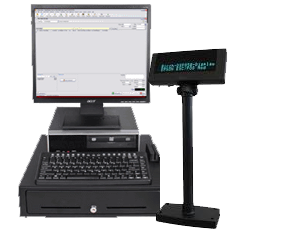
  • A retail POS system check out hardware usually comprises of a computer, monitor, cash drawer, receipt printer, customer display and a barcode scanner, PIN pad with built-in card swipe – not to speak of debit/credit card reader so essential for today’s buying culture.
  • Retail stores perform sale of goods or merchandise from within a fixed premises and goods are bought directly by the end-user.
  • A retail POS system is the most important purchases you will make for your business.

  • Retail establishments are thus the end point of the distribution network of a manufacturer or importer of goods.
  • Retail POS software such as cash drawer and retail POS equipment will provide you a complete POS solution for your retail business.
  • The POS for a retail store, restaurant or liquor will be different from the type of system and software needed for a restaurant or any other type of businesses.
  • Retail POS software is a tool that assists business owners in making transactions more easy and fast for both the sellers and buyers.
  • When the retailers use the retail POS computer technology, there are so many more benefits to a business.

Wednesday, March 16, 2011

Retail POS Systems


When you have implemented complete POS system in your business, then you can save more money. It is because with its increased functionality, you can know your detailed sales report and with this you will be more informed on purchasing decisions. You can even know the complete audit report even if you are away from the business.

Utilizing the complete POS system boosts your profit and with the help of POS software, every transaction is time stamped and this allows you to identify the peak selling hours. With the help of these details, you can increase the staff during peak hours and can identify the items that are sold in large in numbers.

A good point of sales system enhances you to run a more efficient business and avoid unnecessary works in your business. With the help of retail POS systems, there is no problem of double entry in orders, no guessing games around sales trends and your customers don’t need to wait for a long time. So overall it increases your customers and enhances you to provide an improved customer service.